
Piano Magic Beat 4: Music Game
PulseBeat StudiosMusic
4.984.00 Reviews
- Version
- 2.6.0
- Installs
- 5.00M
- Age Rating
- Everyone
Screenshots


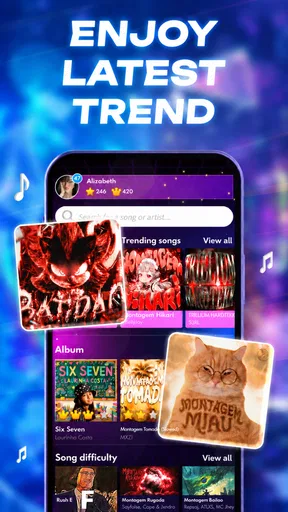
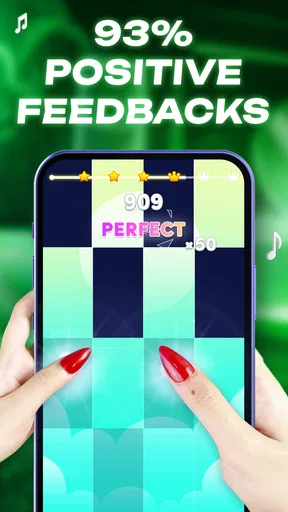
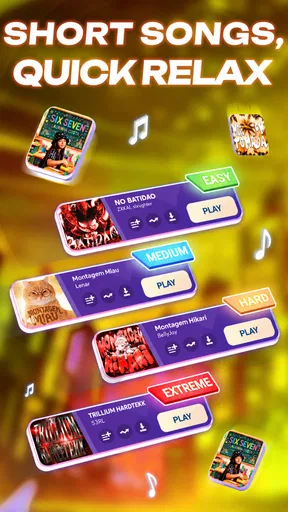


Our Review of Piano Magic Beat 4: Music Game
 Analysis by Appyee
I spent time with Piano Magic Beat 4: Music Game as a quick-play rhythm game, and my first impression was clear: it is built for people who want immediate musical interaction rather than a full piano-learning course. The idea is simple enough to understand in seconds, but the timing demand gives each short session a little more tension than a casual tap game. You follow the song, watch the tiles, and try to keep your hands aligned with the beat.
That simplicity is the main reason I can imagine recommending it to a friend. I can open it when I have only a few minutes, play without preparing an instrument, and stop without feeling as though I abandoned a long campaign. At the same time, anyone expecting accurate piano practice, deep composition tools, or the freedom of a traditional music player should approach it with different expectations. This is a game first, and its musical theme supports the action rather than replacing it.
How the current version feels in everyday play
The current release is version 2.6.0, and the game comes from PulseBeat Studios. It is free to play, carries an Everyone age rating, and runs on Android devices using version 7.0 or later. Those details make it easy to place: this is a broadly accessible mobile game aimed at short, low-commitment sessions rather than a specialist instrument app.
In practice, I found the strongest use case to be the small gap in a normal day. Imagine waiting for a friend, sitting on a train, or taking a short break between tasks. Instead of opening a game that requires remembering a storyline or managing a complicated menu, I can go straight into a rhythm challenge. The familiar piano-tile format makes the first attempt approachable, while the need to react in time gives me a reason to replay a song rather than treating it as a one-time distraction.
The store summary presents it as a relaxing rhythm experience, and that description is fair only up to a point. The music can create a calm mood when I am playing carefully, but missed tiles quickly turn that calm into concentration. I would describe it as relaxing during the opening moments of a session and more demanding once I start chasing cleaner timing. That contrast is useful: it works as a gentle break, but it can also become a small reflex test.
The game’s appeal is not dependent on learning complicated controls. Tapping is the central action, so the challenge comes from reading movement, anticipating the next beat, and avoiding rushed fingers. That makes it a reasonable choice for someone who has never played a rhythm game. It also means experienced players may understand the basic loop almost immediately and judge the experience by song variety, timing quality, and how satisfying repeated attempts feel.
What the numbers suggest about its audience
The game has earned a 4.9 average from around twenty-four thousand ratings and has passed five million installs. Those figures point to a large audience and unusually strong public approval, although they do not remove the need to decide whether this particular style of play suits you. A high rating can tell me that many people enjoy the experience; it cannot turn a tile-tapping game into a piano simulator for someone seeking structured musical training.
There are also eighty-four written reviews shown alongside those ratings. I treat that combination carefully. The broad rating gives a useful signal about general satisfaction, while the smaller written sample is more helpful for noticing the kinds of praise or frustration people choose to describe. For my own decision, I would place more weight on the actual interaction: whether the notes feel readable, whether the pace is comfortable, and whether the available music keeps me interested after the novelty fades.
What changed by version 2.6.0
The current version gives the game a defined point in its development, especially because the title was released on May 30, 2025. That does not mean I should assume every update transformed the experience or that future releases will follow a particular schedule. What I can say is that version 2.6.0 represents the present form a new player will encounter, so older impressions may not perfectly describe today’s menus, song presentation, or overall polish.
When I evaluate an evolving rhythm game, I look for the practical effect of the current build rather than treating a version number as a promise. A later version can matter if it makes the first session clearer, improves consistency, or helps returning players get back into the action. It can also leave the central loop unchanged, which is not automatically a problem. For this game, the essential question remains whether the tap-to-beat interaction feels dependable and enjoyable over repeated plays.
I would not read the version label as evidence of a particular feature unless the game visibly presents it during use. That distinction matters for anyone comparing screenshots, older reviews, or recommendations from friends. The safest expectation is that the current build is the one to judge: start a session, learn how its timing feels on your device, and decide from that experience rather than from assumptions about a previous edition.
Why the simple controls work, and where they can frustrate
The biggest strength is the low barrier to entry. I do not need to understand a virtual keyboard, map finger positions to notes, or spend time configuring a practice routine. The connection between what I see and what I tap is immediate. This is especially useful for younger players, casual gamers, and people who enjoy music-themed games but do not identify as musicians.
The trade-off is that the same simplicity can make mistakes feel less forgiving. In a conventional piano app, pressing a wrong key may still produce a note that teaches me something. Here, a missed or poorly timed tile is primarily a gameplay failure. That is satisfying when I want a challenge, but less useful when my goal is to build musical technique. I would choose this game for rhythm and reaction practice, not for learning scales, reading notation, or developing hand independence.
Screen size also affects the experience. On a compact phone, the action can feel concentrated and fast, particularly when several taps arrive close together. A larger screen may make the visual path easier to read, but it does not automatically solve timing mistakes. My practical tip is to begin with short sessions and pay attention to whether I am reacting to each tile or simply tapping ahead in panic. The latter usually makes the game feel harder than it needs to be.
Another useful habit is to play with a stable grip. Holding the phone loosely while tapping with one hand can introduce movement that feels like a timing problem. Supporting the device with the other hand gives more control and makes repeated attempts less tiring. This is a small adjustment, but it changes the experience more than many new players expect because rhythm games punish inconsistent physical positioning.
How I would use it in a normal day
For a short break, I would play one or two songs with the aim of staying focused rather than immediately chasing perfection. That keeps the game in its strongest role: a compact musical distraction. If I had a longer wait, I would replay a familiar track and use the second attempt to notice where my attention breaks down. This turns a simple session into a modest concentration exercise without pretending that it is formal training.
I can also see it working as a gentle introduction to rhythm games for a family. The Everyone rating makes it suitable for a broad audience, and the basic interaction is easy to demonstrate. I would still play alongside a child at first, not because the controls are complicated, but because any fast-tapping game is easier to enjoy when expectations are clear. The fun should come from matching the beat and improving, not from treating every miss as a serious failure.
For someone who listens to music while commuting, this game offers a more active alternative to simply opening a playlist. The important distinction is that it demands attention. I would not use it when walking near traffic, crossing roads, or doing anything else that requires awareness of my surroundings. Its short-session design is convenient, but convenience should not turn into distracted play in unsafe situations.
How it compares with other music apps and games
Compared with a regular music-streaming app, this game gives me participation instead of passive listening. I am not choosing an album and letting it run; I am responding to a visual rhythm challenge. That makes it better for a quick burst of engagement, but worse when I want uninterrupted listening, a personal library, or control over the exact music experience.
Compared with a piano-learning app, it is much more approachable and much less educational. A learning tool normally helps connect notes, exercises, and musical concepts. Piano Magic Beat 4: Music Game focuses on the satisfaction of successful timing. If a friend told me they wanted to learn to play piano, I would point them toward a dedicated lesson app or a real keyboard instead. If they wanted a music-flavored game that starts quickly, I would suggest this one.
Compared with deeper rhythm games, the attraction here is likely the directness. There is less mental overhead in understanding the basic action, which helps when I want something I can pick up immediately. The downside is that players who enjoy elaborate progression, complex input patterns, or a large competitive ecosystem may find the experience too narrow. The right comparison is not “which game is objectively better?” but “do I want a clean tile-tapping session or a more involved rhythm system?”
Where returning players may notice the limits
The central loop is also the main limitation. Once I understand how to follow the tiles, long-term enjoyment depends heavily on how much I like repeating songs and improving timing. Players who need constant new mechanics may lose interest sooner than players who enjoy mastery through repetition. That is not a flaw in the concept, but it is an important trade-off before installing a free game with a deliberately focused design.
I also would not confuse the word “piano” with the freedom to play any melody I choose. The experience is organized around following the game’s presented patterns. That means it suits guided play, not experimentation. Someone who wants to improvise, record original ideas, or use a phone as a virtual instrument should look for a different category of app.
There is a similar distinction with relaxation. The game can help me unwind when I accept the pace and play casually, but a difficult sequence can make it more stimulating than soothing. If I am already tired or irritated, I would choose a passive music app instead. If I want a small challenge that keeps my mind occupied, the tapping format is a better fit.
What existing users should expect from its evolution
Players coming from an earlier build should judge version 2.6.0 by how it feels in their own routine rather than expecting a completely different game. The identity remains tied to piano-style rhythm play, so the most meaningful improvements for returning users are likely to be found in everyday smoothness, clarity, and replay comfort rather than in a change of genre.
New users have an advantage because they can form their opinion without comparing the current experience with an older one. I recommend giving it enough time for the first novelty to pass. One successful song can be exciting, but the more revealing test is whether I want to try again after a miss and whether repeating a pattern feels like progress rather than busywork.
For both groups, device fit matters. Android support beginning with version 7.0 makes the game available to a wide range of compatible phones, but software compatibility alone does not guarantee identical comfort on every screen. I would test the touch response in a quiet moment, keep the display clean, and avoid judging the game from a single rushed attempt.
What I would watch in future updates
If I were following the game over time, I would watch for changes that improve the connection between music and touch without making the controls harder to understand. Better onboarding, clearer feedback after a missed tile, and thoughtful handling of song repetition would all matter to me because they affect whether a new player becomes a returning one.
I would also pay attention to how the game serves two different audiences: people seeking a calming break and people chasing higher accuracy. Those players want different things from the same session. A relaxed player benefits from a forgiving introduction, while a focused player needs timing that feels consistent enough to reward careful practice. Balancing those needs is more important than simply adding visual decoration.
Finally, I would look for signs that the music selection and presentation continue to justify repeated play. I am deliberately separating that expectation from a claim about features not established here. The reason it matters is straightforward: a rhythm game lives or dies by the relationship between its patterns and the player’s desire to hear and play them again. If that relationship stays enjoyable, the simple format can remain effective.
My recommendation after playing
I recommend Piano Magic Beat 4: Music Game to anyone who wants a free, accessible rhythm game for short sessions and likes the feeling of tapping along with music. Its Everyone rating and broad Android compatibility make it an easy option to try, while its strong public reception suggests that many players find the core experience appealing. I especially like it for breaks when I want active entertainment without the commitment of a larger game.
I would skip it if my priority is genuine piano instruction, music creation, uninterrupted listening, or a highly elaborate rhythm system. Those needs call for different tools, and choosing this game for them would lead to disappointment. Its value comes from focus: it turns musical timing into a straightforward mobile challenge.
My final view is positive but measured. The game does not need complicated systems to be enjoyable, and the current version delivers a clear reason to return: try again, listen more closely, and tap with better control. It is best understood as a compact rhythm pastime, not a replacement for a piano. If that distinction matches what you want, downloading this free music game is an easy decision to justify.
Verdict
Strengths of Piano Magic Beat 4: Music Game
- Simple tap-based controls are easy for beginners to learn.
- Wide song selection keeps short play sessions varied.
- Bright visual effects make performances feel lively.
- Offline play is useful when you have no internet connection.
- Increasing speed provides a satisfying challenge for rhythm fans.
Limitations of Piano Magic Beat 4: Music Game
- Frequent ads may interrupt gameplay between songs.
- Some tracks and features require in-app purchases.
- Fast sections can feel difficult on smaller phone screens.
- Touch accuracy may vary depending on device response.
- The game can become repetitive after extended sessions.
Other Releases by PulseBeat Studios
View All
My Singing Pet: Pop Piano Game
Music4.7
Similar Picks in This Category
View All
Tiles Hop Music & Ball Game
AMANOTES PTE. LTD.4.3

Magic Tiles 3™ - Piano Game
AMANOTES PTE. LTD.4.6

Real Piano
Bilkon3.7

Piano Game: Classic Music Song
Dream Tiles Piano Game Studio4.0

Smash Colors: Music Ball Rush
BADSNOWBALL HONGKONG LIMITED4.2

Piano Music Go-EDM Piano Games
Joy Journey Music Games4.5
Frequently Asked Questions
What is Piano Magic Beat 4: Music Game?
Piano Magic Beat 4: Music Game is a rhythm-based mobile game in which you tap piano-style tiles in time with songs. The objective is to follow the beat accurately, avoid missing notes, and complete increasingly challenging levels. It is designed for short, casual sessions, while faster songs and higher scores provide extra difficulty for players who enjoy improving their timing.
How do you play Piano Magic Beat 4: Music Game?
Gameplay is simple to learn: notes or black tiles move across the screen, and you tap them when they reach the correct area. Missing a tile can interrupt the song or reduce your progress, so concentration and timing are important. As levels become faster, players need quicker reactions. The game generally supports touch controls that are easy to understand for beginners.
Does Piano Magic Beat 4: Music Game require an internet connection?
Some features may work without a constant internet connection, particularly basic gameplay that has already been installed. However, an internet connection may be needed for advertisements, downloading songs or additional content, synchronizing progress, updating the game, or accessing online rankings. Availability can vary by version and device, so players should check the current store description and test offline access after installation.
Is Piano Magic Beat 4: Music Game free to download and play?
The game is generally available as a free download, allowing users to try its core rhythm gameplay without an upfront purchase. Free versions may include advertisements, optional purchases, extra song packs, or other items that can improve convenience or expand the available content. Before downloading, review the store listing for current in-app purchase details and consider enabling purchase restrictions for children.
Is Piano Magic Beat 4: Music Game suitable for children and casual players?
The straightforward tap-based controls make Piano Magic Beat 4: Music Game accessible to casual players and children who enjoy music games. Nevertheless, the speed can become demanding, and younger users may encounter advertising or optional purchases depending on the version. Parents should check the age rating, privacy information, and permission requests, and supervise play if the device is shared with a child.
Play our best games!


